
DTF · DTG · UV DTF · Stickers
Stop printing empty film.
Nest by real shape.
Nesting Imposer packs artwork by its actual outline, not by its bounding box — so the same sheet carries more pieces. White channel, cut marks and job costs come with it.
Buy for €79.20 Start the free 7-day trialFree for 7 days · No credit card required
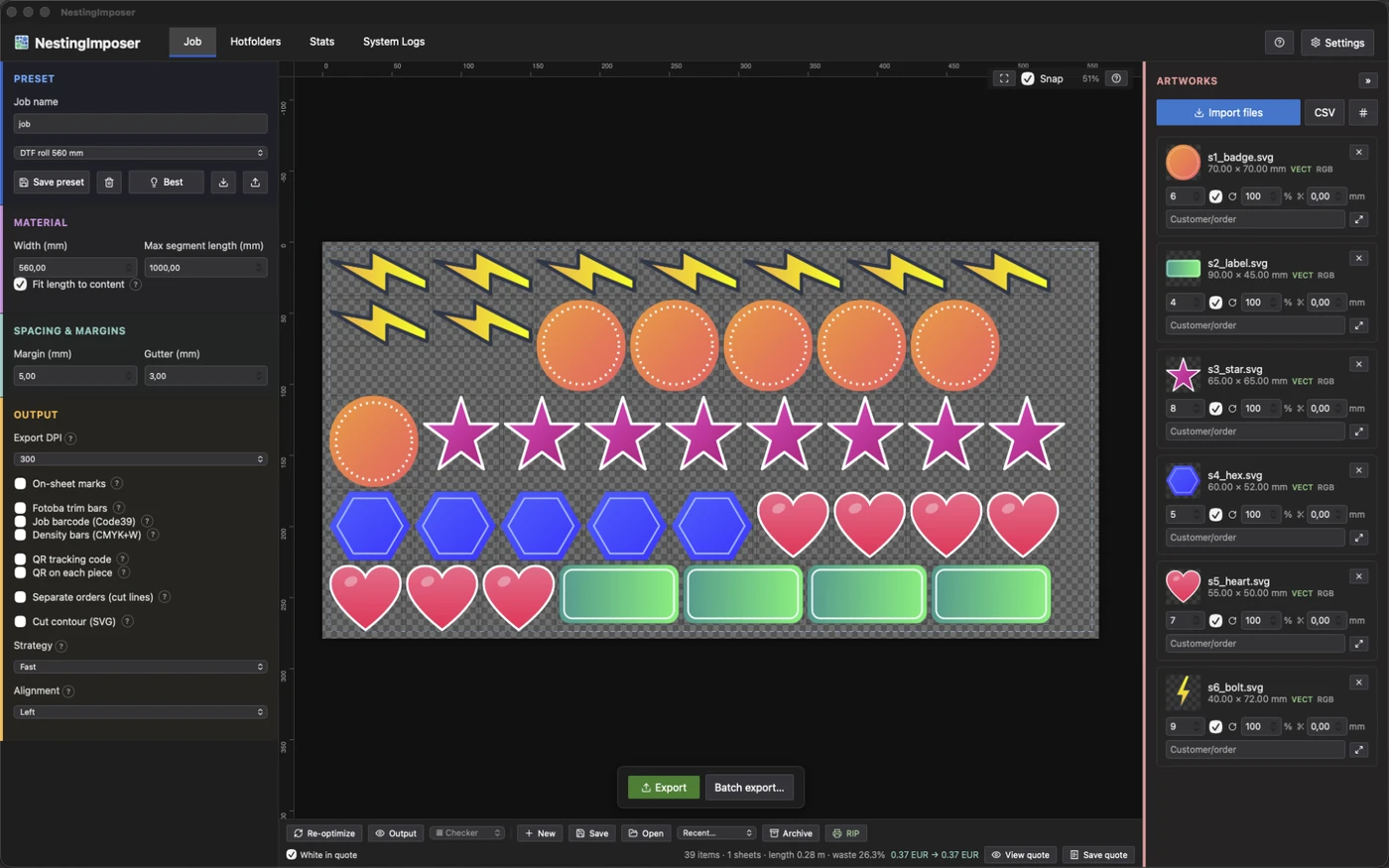
Built for gang sheets
Everything a print shop needs between the artwork and the RIP.
True-shape nesting
Pieces are placed by their real outline with 0/90/180/270 rotations, so concave shapes slot into each other instead of reserving empty rectangles.
Costs measured, not guessed
Ink (CMYK and white), film and adhesive are measured on the layout you actually print, then priced with your rates per litre, per square metre and per kilo.
White channel that behaves
White under-base with density control, optional second pass and an adaptive choke computed per design, so no white halo peeks out from under the colour.
Marks and cutting
Registration marks in seven styles, Fotoba bars, sheet and piece QR codes, Code 39 barcodes and a cut contour that follows the real outline as a spot separation with overprint.
Automation
A hotfolder that picks files up as they land, CSV order import with quantity and customer, and batch export of saved jobs.
Export your RIP accepts
PDF with vector passthrough, PNG, and separated TIFF carrying CMYK plus a named white ink — at the DPI your printer expects.
How it works
From customer artwork to the file your RIP wants, in four steps.
Drop the artwork
PNG, JPG, TIFF, SVG or PDF, one artwork per page. Size, DPI and transparent bounds are read on import, and identical pages become a quantity.
Pick sheet or roll
Load a material preset: width, margins, gutter, bleed per file, maximum roll segment and the rounding step you invoice by.
Nest
Choose fast, balanced or best: the nester fills the sheet by real shape, leaves locked pieces where you put them and lists anything that did not fit.
Export
White channel, marks, cut contour and the cost report come out in one pass, as PDF, PNG or separated TIFF.
Real shape, not bounding box
Masks are built from the alpha channel on a fine grid, so a curved logo can sit inside the notch of another one instead of next to it.
Long rolls, real segments
Layouts longer than the printer's maximum are split into segments, each trimmed to the length actually used and rounded to your commercial step.
Cost per job and per piece
Ink, film and adhesive land in the job report with the price per piece, so quoting takes seconds instead of a spreadsheet.

Automation is
the whole point.
Set the rules once and let the shop run: same layout logic, same marks, same output, job after job.
- Hotfolder: files dropped in are nested and exported on their own, with the quantity read from the file name.
- CSV orders: file, quantity and customer imported in one go.
- Batch export of saved jobs, with or without re-nesting them.
- Material presets, so the shop floor picks one name instead of twelve numbers.
Specifications
The short version, for people who read tables.
- Platform
- macOS on Apple Silicon · Windows 10/11 (64-bit)
- Artwork in
- PNG, JPG, TIFF (CMYK included), SVG, multi-page PDF
- Files out
- PDF with vector passthrough, PNG, separated TIFF (CMYK + named white ink), white sidecar PNG
- Print modes
- DTF, DTG, UV DTF, stickers
- Nesting
- True shape with 0/90/180/270 rotations, three strategies (fast, balanced, best), sheets and rolls with segments
- Automation
- Hotfolder, CSV order import, batch export of saved jobs
- App languages
- English, Italiano, Français, Español, Deutsch
- Price
- €79.20 + VAT for a limited time (list price €99) — one-time payment, lifetime licence, no subscription
- Trial
- 7 days, no credit card required
Updated October 2026
Questions
What print shops ask before buying.
What is a gang sheet?
A single sheet, or a length of roll, carrying many different designs printed in one pass and cut afterwards. How tightly it is packed is where a DTF shop makes or loses its margin.
Which files can I import?
PNG, JPG, TIFF (CMYK included), SVG and PDF. A multi-page PDF becomes one artwork per page, and pages that are identical are merged into a quantity instead of duplicated.
Does it really nest by shape, or just by rectangles?
By shape. Each piece gets a mask from its alpha channel and is placed along that outline, with 0, 90, 180 and 270 degree rotations, so concave pieces interlock. Rectangle packing is exactly what leaves the film empty.
Does it handle rolls, not just sheets?
Yes. A roll layout is split into segments no longer than your printer's maximum print length, each segment shrinks to the length actually used, and the total is rounded to the commercial step you sell by.
How is the white channel produced?
As an under-base built from the artwork itself, with density control, an optional second pass and an adaptive choke computed per design, so the white stays hidden under the colour instead of showing as a halo at the edges.
Can it prepare the cutting step?
Registration marks in seven styles, Fotoba cutting bars, Code 39 barcodes, QR codes per sheet and per piece, and a cut contour that follows the real outline as a spot separation with overprint — what a cutting plotter expects to find.
How are the costs calculated?
From the layout, not from a guess: the app measures ink coverage per channel including white, the film area used and the adhesive, then applies your prices per litre, per square metre and per kilo. Set a price to zero and that component drops out.
Is there a Windows version?
Yes — the app ships for both macOS (Apple Silicon) and Windows 10/11 (64-bit). Both installers are on the download page. The Windows build needs a processor with AVX support, i.e. an Intel or AMD CPU from 2011 onwards; on older processors the app will not start.
How does the licence work?
One payment, no subscription. The licence is activated online on the workstation you use, then keeps working offline; you can release it from within the app and activate it on another machine.
My question is not here.
Write to us and a human answers: support@imposerpro.com
Ready to fill the film?
One-time payment, no subscription, no fee per sheet.
+ VAT
You save €19.80
AWDISCOUNT20
Applied automatically at checkout
Want to try it first? The discount also applies if you buy after the free trial, while the offer lasts.
VAT excluded — calculated at checkout based on your country.
One-time payment. Lifetime licence. No subscription.
Get Nesting Imposer Start the free 7-day trial
macOS on Apple Silicon · Windows 10/11 (64-bit)