 Imposer Pro
What Is PDF Imposition? A Practical Guide for Print
Last updated:
Imposition is the step between a finished PDF and a printing press: arranging the document's pages onto larger press sheets so that, after printing, folding and cutting, everything ends up in the right order, at the right size, with clean edges.
The problem imposition solves
Commercial presses and production printers don't print single A5 flyers or single book pages — they print on large sheets (SRA3, B2, B1…) or rolls. Printing one small page per large sheet would waste most of the paper and most of the press time. Imposition packs as many pages as possible onto each sheet, in an arrangement that survives the finishing steps: guillotine cutting, folding, stitching, binding.
Get it wrong and the mistakes are physical: page 5 ends up where page 3 should be, margins drift after trimming, or a whole run has to be reprinted. That's why prepress operators treat imposition as the most safety-critical step of the workflow.
The four core imposition layouts
1. Step & repeat
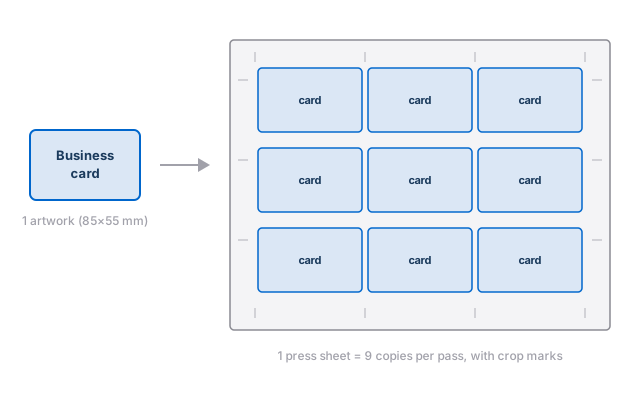
The same artwork is repeated in a grid across the sheet — the standard layout for business cards, labels, stickers, tickets and any product printed in quantity. A 9-up grid means every printed sheet yields nine copies.
2. N-up
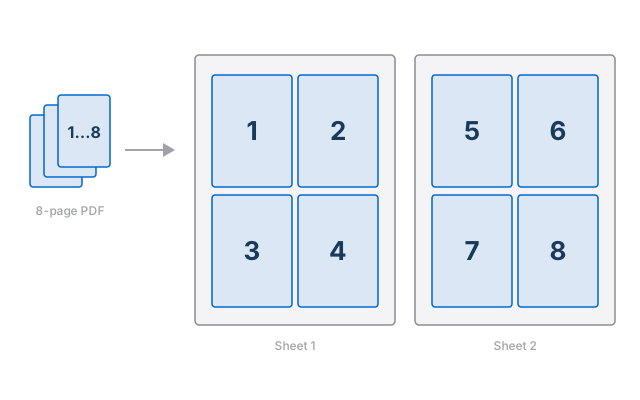
Sequential pages are placed n per sheet in reading order — pages 1–4 on the first sheet, 5–8 on the second, and so on. Used for proofing, handouts, and any job where the sheets are read as-is rather than cut and reassembled.
3. Cut & stack
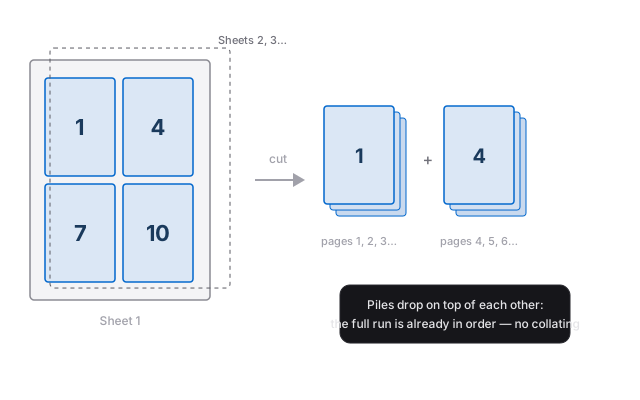
Pages are distributed so that after the sheets are stacked and cut, the resulting piles drop on top of each other already in order. For a 300-page manual printed 4-up, the guillotine operator makes the cuts, stacks the piles, and the complete, collated document is ready — no manual sorting. This is the layout that saves the most bindery time on digital presses.
4. Booklet (saddle-stitch)
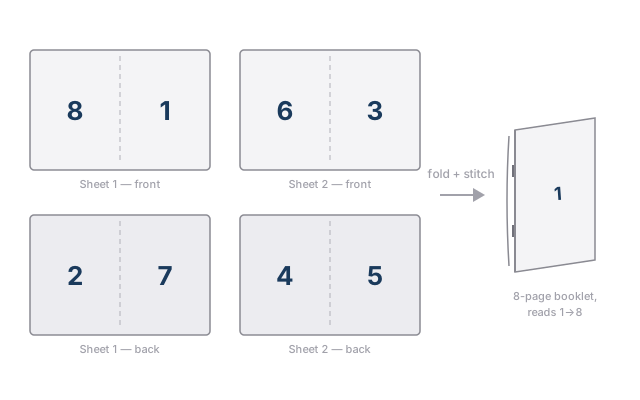
Pages are paired on sheets so that when the printed sheets are folded together and stapled on the spine, the booklet reads correctly from 1 to the end. The page pairing is unintuitive — the first sheet of an 8-page booklet carries pages 8 and 1 on the front, 2 and 7 on the back — which is exactly why software should do it. We cover this layout in depth in the booklet imposition guide.
Marks, bleed and cut lines
An imposed sheet carries more than pages:
- Crop marks show the guillotine operator exactly where to cut each piece.
- Bleed is artwork extended past the trim line (typically 3 mm) so that a hair of cutting tolerance never leaves a white sliver on the edge.
- Slug / job info is a strip outside the trim area with the job name, date and sheet number — invaluable when twenty jobs share the same stack of sheets.
Good imposition software places all of these automatically from the source PDF's trim and bleed boxes.
Creep: the detail that ruins booklets
In a saddle-stitched booklet, every folded sheet nests inside the previous one. Paper has thickness, so the inner sheets push outward at the fore-edge; after trimming, content on the inner pages sits visibly closer to the edge. The fix — creep compensation — nudges page content toward the spine by a distance that grows with page count and paper weight. It's a per-job calculation that manual imposition tends to skip, and readers notice. See the booklet guide for the numbers.
Manual vs automated imposition
Imposition used to mean an operator dragging pages into position job by job. Modern workflows automate it two ways:
- Presets — a saved layout ("SRA3, 9-up business cards, 3 mm bleed, crop marks") applied to any new PDF in one click.
- Hotfolders — a watched folder wired to one or more presets. Drop a PDF in; the imposed sheet comes out. A print shop can route every recurring job through hotfolders and touch the software only for exceptions.
Imposition software
Historically imposition lived either inside heavyweight prepress suites or in plug-ins for Adobe Acrobat. A modern standalone tool like Imposer Pro covers the four layouts above with automatic marks, bleed handling, creep compensation and hotfolder automation, natively on macOS and Windows — processing files locally, with no cloud upload.
Frequently asked questions
What is imposition in printing?
Imposition is the arrangement of a document's pages onto larger press sheets so that, after printing, folding and cutting, the pages come out in the correct order and orientation. It saves paper and press time and prepares the job for finishing.
What is the difference between n-up and step & repeat?
Step & repeat repeats the same artwork many times on one sheet (business cards, labels, stickers). N-up places different, sequential pages on the sheet in reading order (pages 1–4, then 5–8). Use step & repeat for identical copies and n-up for sequential content.
What is creep in booklet printing?
Creep is the outward push of the inner pages in a folded booklet caused by paper thickness. Without compensation, content on the inner pages ends up closer to the trimmed edge. Creep compensation shifts page content toward the spine by an amount based on page count and paper weight.
Can I do imposition in Adobe Acrobat?
Acrobat alone offers only a basic booklet print option. Real imposition — step & repeat with bleed and marks, cut & stack, signatures, creep compensation, hotfolder automation — needs dedicated software: either an Acrobat plug-in or a standalone imposition tool like Imposer Pro.
Impose your first PDF in minutes
Step & repeat, n-up, cut & stack and saddle-stitch booklets — with hotfolder automation and creep compensation built in.
Try free for 7 days Buy Imposer Pro —One-time payment, lifetime license · No credit card required for the trial · macOS (Apple Silicon) & Windows 10/11