 Imposer Pro
Booklet Imposition: How Saddle-Stitch Printing Actually Works
Last updated:
Saddle-stitch is the most common booklet binding in commercial print — folded sheets nested together and stapled on the spine. It is also the layout where imposition mistakes are most visible. This guide walks through the page math, signatures, and creep.
The rule of four
Every folded sheet in a saddle-stitched booklet carries exactly four pages: two on the front, two on the back. A booklet's page count must therefore be a multiple of 4. A 10-page document becomes a 12-page booklet — imposition software pads the difference with blanks (usually before the back cover, where they're least noticeable).
Reader spreads vs printer spreads
Two ways to pair pages, easy to confuse and disastrous to swap:
- Reader spreads — pages side by side as the reader sees them: 2–3, 4–5, 6–7. Good for proofing on screen. Useless on press.
- Printer spreads — the pairs that share a physical sheet so the folded booklet reads correctly: for 8 pages, the pairs are 8–1, 2–7, 6–3, 4–5.
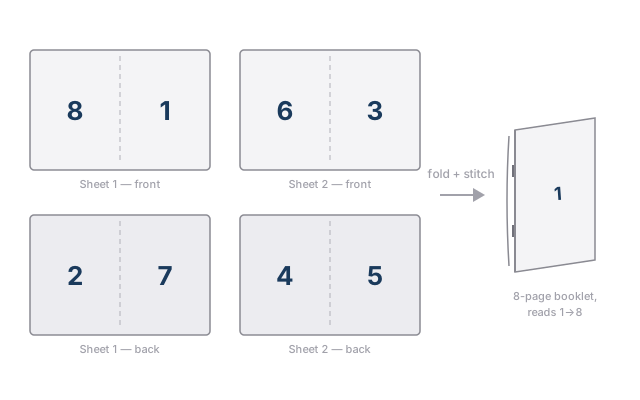
The pattern generalises: on each sheet, the two page numbers of every pair always sum to (page count + 1) — for 8 pages: 8+1, 2+7, 6+3, 4+5 all equal 9. That symmetry is what the fold preserves. It's also exactly the kind of arithmetic nobody should do by hand for a 96-page catalogue.
Signatures: when the booklet outgrows one fold
Past roughly 16–32 pages (depending on paper weight), nesting every sheet into one fold becomes physically impossible — the spine bulges and the stitcher can't close. Larger books are split into signatures: groups of 8, 16 or 32 pages, each folded as its own mini-booklet, then gathered and bound in sequence.
Signature imposition means the page pairing restarts inside each signature, and the signatures must land in the right order after gathering. Imposer Pro computes signature splits and pagination automatically — you choose the signature size, it does the arithmetic.
Creep: why inner pages drift toward the edge
Paper has thickness. When sheets nest inside each other, every added sheet pushes the inner ones outward at the fore-edge. After the trimmer squares the booklet, content on inner pages sits measurably closer to the trimmed edge — on long booklets, enough to clip page numbers.
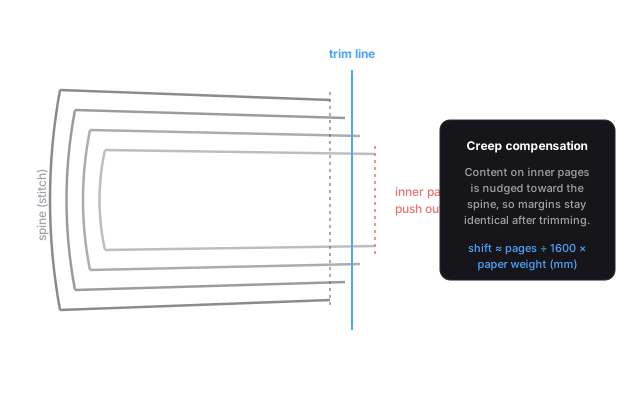
Creep compensation shifts page content progressively toward the spine, so that after trimming, the visual margins are identical from cover to centre. The shift depends on page count and paper thickness. Imposer Pro uses a paper-weight-driven rule:
Enter the paper weight, and the compensation is computed per spread — no lookup tables, no guessing.
Imposing a booklet in Imposer Pro
- Load the PDF (any page count — blanks are added to reach a multiple of 4).
- Choose the Booklet layout and the target sheet size.
- Set signature size if the job needs it (8 / 16 / 32 pages).
- Enter the paper weight — creep compensation is applied automatically.
- Add crop marks and bleed, preview the printer spreads, export the press-ready PDF.
For recurring booklet work, save the setup as a preset and wire it to a hotfolder: every PDF dropped in the folder comes out imposed. More on the general concepts in What is PDF imposition?
Frequently asked questions
Why must the page count be divisible by 4?
Each folded sheet contributes four pages. A 10-page document still consumes 12 booklet pages — the software pads with blanks automatically.
Reader spreads or printer spreads for the press?
Printer spreads, always. Reader spreads (2–3, 4–5…) are for proofing; the press needs the pairs that share a sheet (8–1, 2–7…).
How much creep does my booklet need?
Roughly (pages ÷ 1600) × paper weight in g/m², in mm, at the innermost spread. Thick stock and high page counts make it visible; software should compute it per job.
Booklets without the arithmetic
Imposer Pro pairs pages, splits signatures and compensates creep from the paper weight — automatically, on every job.
Try free for 7 days Buy Imposer Pro —One-time payment, lifetime license · No credit card required for the trial · macOS (Apple Silicon) & Windows 10/11